Garage Door Safety Sensor Troubleshooting: Fix It in 10 Minutes
Your garage door closes halfway and then immediately reverses. Or it won't close at all — just beeps a few times and the opener light blinks. You've checked the opening twice: nothing is in the way. What gives?
In the vast majority of cases, the answer is the safety sensors (officially called photo eyes or photoelectric sensors) — the two small devices mounted near the bottom of your garage door tracks. This guide walks you through every cause of sensor failure, how to read your sensor's LED indicators, and exactly how to fix each problem.
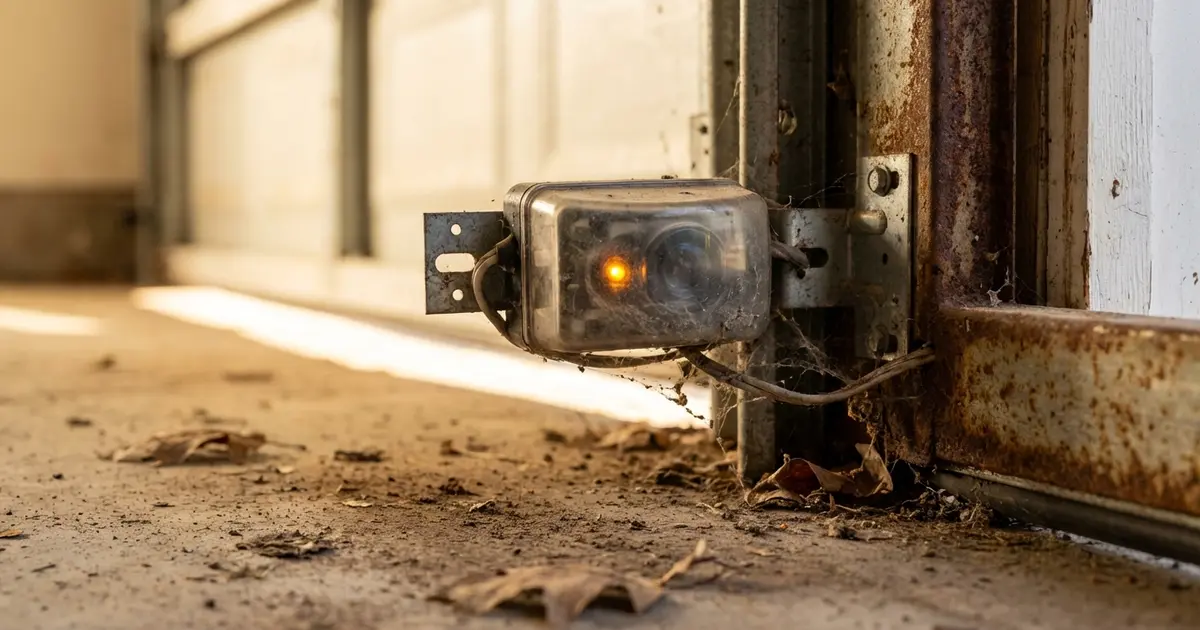
💡 Pro Tip: Before calling a technician, try this: clean both sensor lenses with a dry cloth, check that both LED lights are solid (not blinking), and make sure nothing is blocking the beam path between them.
How Garage Door Safety Sensors Work
Garage door safety sensors are a pair of photoelectric devices — one mounted on each side of the garage door tracks, approximately 4–6 inches above the floor. They function as a light-beam interrupter system:
- The sending sensor (transmitter) continuously emits a narrow beam of infrared light across the width of the door opening
- The receiving sensor (receiver) monitors for that beam — and as long as it detects it, the opener knows the path is clear
- If anything breaks the beam — a person, pet, toy, tool, or even a spider web — the receiver stops detecting the signal and immediately sends a "stop and reverse" command to the opener
This system has been required on all automatic garage door openers sold in the US since January 1993, under UL 325 safety standards. It's what prevents the door from crushing anything in its path.
The Sensors Are Low-Tech but Temperamental
Despite doing a critical safety job, the sensors themselves are simple devices. They're mounted in adjustable brackets, connected to the opener by low-voltage wiring, and aligned manually. This simplicity is what makes them relatively easy to troubleshoot — most sensor problems are caused by:
- Mechanical misalignment (the sensors are no longer pointing at each other)
- Dirty lenses (dust, spider webs, moisture)
- Sunlight interference
- Physical obstructions in the beam path
- Wiring problems (loose connections, damaged wires)
- Failed sensor unit (less common — usually only after physical damage)
✅ Key Takeaway: Check the LED lights first — always. Solid LEDs (usually green/amber) = aligned and working. Blinking or dark = alignment or wiring problem. This tells you exactly where to look before touching anything.
Reading the LED Indicator Lights: Your First Diagnostic Tool
Every safety sensor has a small LED indicator. These LEDs are your first diagnostic tool — understanding what they're telling you narrows down the problem immediately without any testing.
LiftMaster / Chamberlain Sensors (Most Common)
| Sensor | LED Color | LED State | Meaning |
|---|---|---|---|
| Sending sensor | Amber / Yellow | Steady ON | ✅ Normal — sensor has power and is transmitting |
| Sending sensor | Amber / Yellow | OFF | ❌ No power — check wiring connection at sensor and opener |
| Receiving sensor | Green | Steady ON | ✅ Normal — beam is being received; path is clear |
| Receiving sensor | Green | Blinking | ⚠️ Misaligned or blocked — sensor cannot find the beam |
| Receiving sensor | Green | OFF | ❌ No power or failed sensor |
Genie Sensors
| Sensor | LED Color | LED State | Meaning |
|---|---|---|---|
| Sending sensor | Green | Steady ON | ✅ Normal — transmitting |
| Receiving sensor | Red / Amber | Steady ON | ✅ Normal — beam received, clear path |
| Receiving sensor | Red / Amber | Blinking or OFF | ⚠️ Misalignment or obstruction |
Craftsman Sensors
Most Craftsman openers use Chamberlain-platform sensors with the same LED behavior as LiftMaster: amber/yellow on the sending unit, green on the receiving unit.
General Rule Across All Brands
The rule that holds across virtually all brands: if either LED is off or blinking, the system is not functioning correctly and the door will refuse to close normally. Both LEDs should be steady when the system is working properly.
Pro tip: If your opener is beeping or the overhead light is flashing a specific number of times when you press the close button, count the flashes. Many openers use flash codes — typically 4 flashes = sensor issue. Consult your opener's manual with the code count for a precise diagnosis.
Quick 2-Minute Diagnosis
Before diving into specific fixes, run this 2-minute diagnosis to identify which problem you're dealing with:
- Look at both sensor LEDs right now. Are they both steady? If yes — the sensor beam is intact, and your issue may be with the opener's force settings, not the sensors. If one is blinking or off, continue.
- Physically inspect the sensor mounting. Are the brackets bent? Did something knock a sensor loose? Look for physical damage to the sensor housing or wiring.
- Check for obvious obstructions. Cobwebs, a garden hose, a piece of weatherstrip that fell off, a box near the door — anything within 2 inches of the sensor beam path.
- Check the time of day. Is the sun currently low and shining directly into your garage opening? Afternoon sun can blind the receiving sensor — this is one of the most commonly overlooked causes.
- Inspect the wiring. Follow the wires from each sensor up the door frame to where they connect to the opener. Look for wires that have been pinched, cut, stapled through, or that have come loose from terminal connections.
In most cases, one of these checks will identify the issue immediately. Now for the specific fixes:
Fix 1: Sensor Misalignment (Most Common Cause)
Misalignment is the #1 cause of safety sensor problems. Sensors can get knocked out of alignment by a car bumping the track, a child playing near the door, settling of the house, or just normal vibration over years of operation. Even a few degrees of tilt can break the beam.
Signs It's a Misalignment Issue
- The receiving sensor LED is blinking (not steady)
- The problem appeared suddenly with no other changes
- One sensor bracket looks visibly tilted or bent compared to the other
How to Realign the Sensors
What you need: A screwdriver or 5/16" nut driver (to loosen the mounting bracket)
- Loosen (do not remove) the wing nut or mounting bolt on the bracket of the sensor with the blinking or off LED. You want it loose enough to pivot the sensor head with your hand.
- Watch the LED on that sensor while slowly rotating and tilting the sensor head. You're trying to aim it directly at the other sensor on the opposite side of the door.
- When the LED becomes steady (stops blinking), you're in the right zone. Hold the sensor in that position.
- Tighten the mounting nut/bolt while keeping the sensor aimed correctly. Overtightening can shift the sensor slightly — tighten firmly but don't gorilla it.
- Step back and verify: both sensor LEDs should now be steady. Try the door.
Tip: If you're having trouble getting both LEDs steady, temporarily tape a small piece of cardboard to the sending sensor as a directional shield — it forces the beam to be more precise and helps you see when you're perfectly aligned.
If the Bracket Is Bent
If the bracket itself is bent, loosen it from the track and gently bend it back with pliers — or replace the bracket (they're inexpensive, around $10–$20 from any garage door supplier or hardware store). A bent bracket can prevent proper alignment even after adjustment.
Fix 2: Dirty Sensor Lenses
The sensor lenses are small plastic or glass windows through which the infrared beam passes. Over time, they accumulate dust, garage grime, spider webs, and moisture condensation — all of which can attenuate the beam enough to cause intermittent or permanent sensor failure.
Signs It's a Dirty Lens Issue
- Problem appeared gradually (the sensor worked fine for months, then started being intermittent)
- Visible dirt, cobwebs, or haze on the sensor face
- Problem is worse on humid days (condensation on lens)
How to Clean the Sensors
- Dampen a soft, lint-free cloth with a small amount of rubbing alcohol or glass cleaner
- Gently wipe the lens face on both sensors
- Allow to air dry for 30 seconds before testing
- Check the sensor LEDs — they should now be steady
Don't use: abrasive cloths, paper towels (they can scratch plastic lenses), or solvent-based cleaners that could damage the housing.
This fix takes 2 minutes and costs nothing. It solves a surprising percentage of "the door won't close" calls that homeowners make to technicians. Try this first.
Fix 3: Sunlight Interference
This is one of the most frustrating sensor problems because it's intermittent and seasonal — the door works perfectly in the morning but refuses to close reliably in the afternoon, or it only happens during certain months of the year when the sun angle is right.
How Sunlight Causes Sensor Problems
Photo eye sensors use infrared light. Sunlight contains strong infrared radiation. When the sun shines directly into the receiving sensor's lens, it overwhelms the sensor with ambient infrared — the sensor effectively can't distinguish the beam from the sender against the bright infrared background noise from the sun.
Signs It's a Sunlight Issue
- Problem only occurs at certain times of day (late afternoon is most common)
- Problem only happens during certain seasons
- Door closes fine after the sun moves behind the roofline
- Receiving sensor LED blinks or looks washed out when you look at it
How to Fix Sunlight Interference
Option 1 — Create a sun visor (free, 5 minutes): Cut a small piece of cardboard (about 2" x 3") and tape it above the receiving sensor lens to act as a shade. This is a reliable DIY fix for most sun interference cases.
Option 2 — Rotate the sensor: Loosen the bracket slightly and rotate the receiving sensor's face away from the direct sun angle while maintaining alignment. Even a 15–20 degree rotation can dramatically reduce sun interference.
Option 3 — Install a sun shield: Purpose-made sensor sun shields (small plastic hoods that attach to the sensor bracket) are available from garage door suppliers for $5–$15. These are the most durable solution.
Option 4 — Upgrade to sun-resistant sensors: Some modern sensor models (including newer LiftMaster models) have better ambient light rejection and are less susceptible to sun interference. If you're already replacing sensors, this is worth noting.
Fix 4: Physical Obstructions in the Beam Path
The sensor beam travels at approximately 4–6 inches above the floor across the full width of the garage opening. Anything in that path — even something you don't immediately see — will prevent the door from closing.
Common Obstructions to Check
- Cobwebs — A spider web strung directly through the beam is enough to break it. Sweep the area around and between the sensors, especially along the bottom of the tracks.
- Fallen weatherstrip — If the door's side weatherstrip has come loose and is hanging down near the sensor, it can intermittently break the beam.
- Hoses, extension cords, rope — Items running across the garage floor near the door can sit right in the beam path.
- Small items — A kicked soccer ball sitting near the door edge, a broom handle leaning against the track — these are often missed in a quick inspection.
- Ice or snow — In winter, ice can build up inside the track or at the garage threshold and partially block the sensors.
- The door itself — If a bottom panel is bent or warped, part of the door may intrude into the sensor beam path when the door is near the closed position.
Get down to floor level and look directly across the sensor beam line — that's the most reliable way to spot an obstruction you might otherwise miss from a standing position.
Fix 5: Wiring Problems
Sensor wiring runs from the sensors up the door frame (typically stapled to the wall) and connects to the back of the opener unit on the ceiling. This wiring can be damaged in a variety of ways.
Signs It's a Wiring Issue
- One or both sensor LEDs are completely off (no power at all)
- The problem appeared after someone worked near the door (new cabinets, painting, cable installation)
- Wire visibly damaged, stapled through, pinched, or has a cut in the insulation
- Wires are pulling loose from the terminal connections on the back of the opener
Check the Terminal Connections First
At the back of the opener unit, there are labeled terminal screws where the sensor wires attach — typically labeled "White" and "White/Black" or "SENSOR" and ground. Check that:
- The white wire (from the white LED/sending sensor) is connected to the correct terminal
- The white-with-black-stripe wire (receiving sensor) is connected to its terminal
- Both connections are tight — loose terminal screws are a very common failure point
- The wires are not reversed (swapping them will cause both sensors to fail)
Inspect the Wiring Run
Follow the wires from the opener to each sensor. Look for:
- Staples that were driven through the wire (puncture damage to insulation or the wire itself)
- Areas where the wire has been pinched under a trim piece, door, or cabinet
- Sections that have been nicked, cut, or have exposed copper visible
- Places where the insulation is cracked or brittle (common in garages with large temperature swings)
Repairing Wiring Issues
For a loose connection: tighten the terminal screw.
For a damaged section of wire: the safest repair is to replace the entire wire run from opener to sensor — 18-gauge two-conductor wire is available at hardware stores for a few dollars per foot. This is a DIY-possible repair if you're comfortable with basic low-voltage wiring; the wires carry only 12–24V DC, which is safe to work with.
For complex wiring damage (behind walls, multiple damage points, or uncertain routing), calling a technician is the more reliable choice.
Fix 6: Damaged or Failed Sensor Unit
After ruling out the above causes, a failed sensor is the remaining diagnosis. Sensors can fail from:
- Physical impact (hit by a car bumper, bike, or lawnmower)
- Water damage from flooding or pressure washing near the sensor
- Age-related failure (the LED circuitry eventually burns out, though this typically takes 10–20 years)
- A power surge that damaged the sensor's internal circuit
Confirming a Sensor Has Failed
A failed sensor typically shows: LED completely off despite confirmed working wiring, or LED that stays on but door still won't close (the sensor may be stuck sending a "blocked" signal regardless of actual beam status). If the wiring is confirmed good and all other fixes have been tried, sensor replacement is the next step.
Replacing Safety Sensors: DIY Instructions
Safety sensor replacement is one of the more DIY-accessible garage door repairs. Most sensors use the same low-voltage wire connection and similar mounting brackets.
- Buy the right sensors: Use OEM sensors for your opener brand when possible (LiftMaster, Chamberlain, Genie all sell replacement sensor kits). Universal sensors compatible with most brands are also available and typically cost less. Verify compatibility by checking your opener model number, usually on a label on the motor unit housing.
- Disconnect power to the opener by unplugging it from the ceiling outlet.
- Remove the old sensors: Loosen the bracket mounting bolts, disconnect the wires (photograph the connection before removing so you know which wire goes where), and slide the sensors off the brackets.
- Mount the new sensors: Use the existing brackets if undamaged, or the new brackets included with the sensors. Mount them at the same height (4–6" from floor) on each side of the door.
- Connect the wiring: Match the wire colors per the new sensor's instructions. Typically: white wire to the sending sensor, white/black striped wire to the receiving sensor.
- Restore power and align: Plug the opener back in. Align both sensors until both LEDs are steady. Test the door.
This repair takes 20–45 minutes for most homeowners and requires only basic tools (screwdriver, possibly a nut driver).
Sensor Repair and Replacement Costs
| Service | DIY Cost | Professional Cost |
|---|---|---|
| Sensor realignment only | $0 (free) | $75–$150 (service call) |
| Sensor cleaning (lenses) | $0 (free) | Included in service call |
| Wiring repair (simple) | $5–$15 (wire/connectors) | $75–$150 |
| Sensor replacement (pair) | $20–$60 (parts only) | $95–$210 (parts + labor) |
| Full sensor + wiring replacement | $25–$75 (parts only) | $125–$275 (parts + labor) |
Regional Cost Variation
| Region | Sensor Service Call | Sensor Replacement (Installed) |
|---|---|---|
| Northeast (NY, MA, NJ) | $100–$175 | $150–$275 |
| Southeast (FL, GA, TX) | $75–$130 | $100–$200 |
| Midwest (OH, IL, MI) | $80–$140 | $110–$210 |
| West Coast (CA, WA) | $95–$165 | $130–$250 |
| Mountain/Southwest (CO, AZ) | $80–$145 | $110–$225 |
Sensor issues are among the lower-cost garage door repairs. The real cost risk is waiting too long — if you bypass the sensors (which some older openers allow) and use the door without functioning sensors, the risk of injury from a failing auto-reverse mechanism is significant, especially in homes with children.
DIY vs Calling a Professional
✅ DIY-Safe Sensor Fixes
- Cleaning sensor lenses with a soft cloth
- Checking for and removing obstructions in the beam path
- Realigning sensors by adjusting the bracket (loosen, aim, retighten)
- Installing a sun visor or shade to fix sunlight interference
- Tightening loose terminal connections at the opener
- Replacing sensors with OEM or compatible units (basic low-voltage wiring)
- Running new low-voltage wire between opener and sensors
⚠️ Call a Professional When
- Wiring damage is behind walls, extensive, or you're uncertain about routing
- Sensors have been replaced and the door still won't close (the issue may be the opener's logic board)
- The opener itself is 15+ years old and behaving erratically — sensor issues sometimes indicate a failing logic board that's sending bad signals
- You're not comfortable with basic low-voltage wiring work
- The door exhibits other problems alongside the sensor issue (noise, uneven movement) — this could indicate a larger problem worth a full professional assessment
Read our garage door won't open troubleshooting guide if you're dealing with issues beyond the sensors. For opener-specific decisions, see our opener repair vs replace guide.
How to Test Your Garage Door Sensors Are Working
After any sensor repair, run these tests before returning to normal use:
Test 1: LED Status Check
With the door open and no obstructions present, both sensor LEDs should be steady. If either is blinking, the repair is not yet complete.
Test 2: The Wave Test
- Press the close button on your wall button or remote
- As the door is moving down, wave your hand through the sensor beam (at sensor height)
- The door should immediately reverse
Test 3: The 2x4 Test (Auto-Reverse)
- Place a 2x4 flat on the floor directly under the center of the door
- Press close
- The door should contact the 2x4 and reverse within 2 seconds
Both tests must pass before using the door normally. If the wave test fails, the sensors are still not functioning correctly. If the 2x4 test fails, the opener's mechanical force limit needs adjustment (separate from the sensors).
For a complete safety testing protocol, see our garage door maintenance schedule guide.
Garage Door Safety Sensor Requirements (UL 325)
Since January 1, 1993, all automatic residential garage door openers sold in the US are required to have:
- Photo eye sensors (or entrapment protection equivalent)
- Auto-reverse functionality that reverses the door within 2 seconds of contacting an obstruction
- A means to manually disengage the opener in a power outage
If your home has a garage door opener installed before 1993 with no safety sensors, it is operating outside current safety standards. Replacement openers with sensors are available starting at $150–$300 installed and are strongly recommended — particularly in homes with children, pets, or elderly family members.
Importantly: you should never bypass or disable safety sensors to force the door to close. Most openers have a "hold down" mode that allows the door to close with sensors defeated (you hold the wall button continuously) — this is intended only for emergency use when a sensor has just failed and you need to secure the garage. It is not a workaround for daily use.
Find a Garage Door Sensor Repair Pro Near You
If the DIY fixes above don't resolve your sensor problem, a qualified technician can diagnose and fix it quickly — often in a single service call.
- Find trusted garage door pros in Atlanta
- Find trusted garage door pros in Chicago
- Find trusted garage door pros in Phoenix
- Find trusted garage door pros in Dallas
- Find trusted garage door pros in Seattle
Or browse all cities to find technicians in your area.
Frequently Asked Questions
Why won't my garage door close even though nothing is in the way?
The most common cause is misaligned or dirty safety sensors (photo eyes). The sensors emit an invisible infrared beam across the bottom of the door opening. If the beam is broken or one sensor can't detect the other, the opener refuses to close the door — even when no object is present. Check the sensor LEDs: the sending sensor should show a steady light, and the receiving sensor should also show steady (not blinking). A blinking or off light on either sensor indicates misalignment, obstruction, or a wiring issue.
What do the blinking lights on my garage door sensors mean?
LED behavior varies slightly by brand, but the general pattern is: one sensor (the "sending" unit, usually with a green or amber LED) is always on steady if it has power. The other sensor (the "receiving" unit) shows a steady LED when it's aligned and receiving the beam — and blinks or goes off when it cannot detect the beam from the sending sensor. LiftMaster/Chamberlain typically uses: green LED on one sensor (steady = sending), amber LED on the other (steady = aligned, blinking = misaligned or blocked). If both LEDs are off, check the wiring to the opener.
How do I align garage door safety sensors?
Loosen the wing nut or mounting screw on the sensor bracket (do not fully remove it — just loosen enough to pivot the sensor). While watching the sensor LEDs, slowly tilt and rotate the sensor head until its LED becomes steady (not blinking). Then tighten the bracket. Check from both sides: both sensors should have steady LEDs when properly aligned. If the LED is still blinking after adjustment, clean the lenses and check for sunlight hitting the receiving sensor directly (afternoon sun can overwhelm the sensor — temporary fix: shade the sensor or install a sun shield).
How do I test if my garage door sensors are working?
Two tests: 1) Wave test — while the door is in motion closing, pass your hand or a broom handle through the sensor beam path. The door should immediately reverse. If it doesn't, the sensors are not functioning and the opener force settings may be overriding them. 2) Paper roll test — place a cardboard tube vertically in the sensor beam path and try to close the door. The door should not close. If either test fails, do not use the door normally until the sensors are repaired or replaced.
How much does it cost to replace garage door sensors?
Replacement photo eye sensors cost $20–$60 for OEM-compatible units (LiftMaster, Chamberlain, Genie sensors are widely available). Labor for a technician to replace and align sensors typically adds $75–$150, making total replacement cost $95–$210 in most markets. If only alignment is needed, a service call typically costs $75–$150 for the visit with sensor realignment included. Note: sensor replacement is one of the more DIY-accessible garage door repairs — if you're comfortable with basic wiring, many homeowners do this themselves successfully.
Can bright sunlight interfere with garage door sensors?
Yes. Photo eye sensors use infrared light. In late afternoon, if the sun shines directly into the receiving sensor's lens, the sensor can become "blinded" — it reads ambient infrared as the sensor beam and can behave unpredictably, or fail to receive the actual beam from the sending sensor. This typically manifests as a door that closes fine in the morning but refuses to close in the afternoon. Solutions: rotate the sensor slightly to angle it away from direct sun, install a sun visor or small shade over the receiving sensor lens, or trim nearby bushes that might be reflecting sunlight toward the sensor.
Are garage door safety sensors required by law?
Yes. Since January 1, 1993, all automatic garage door openers sold in the United States are required by UL 325 (a safety standard enforced by the Consumer Product Safety Commission) to include photo eye sensors and auto-reverse functionality. If your opener was installed before 1993 and does not have photo eye sensors, it does not meet current safety standards. Replacement openers with sensors start at $150–$250 installed and are strongly recommended — especially in homes with children or pets.