How to Reset a Garage Door Opener: Step-by-Step for All Brands
Whether you just moved into a new home, lost a remote, need to remove access for a contractor or former houseguest, or your opener is behaving erratically — a garage door opener reset is one of the most useful things you can do. It takes 2–5 minutes and immediately improves your home's security.
This guide covers exactly how to reset and reprogram openers from every major brand — LiftMaster, Chamberlain, Genie, Craftsman, Linear, and more — plus how to reprogram remotes, keypads, and in-car HomeLink systems afterward.
✅ Key Takeaway: Reset (erase all codes) when: moving into a new home, experiencing suspected unauthorized access, or after selling/giving away remotes. For one lost remote, reprogram just that device instead of resetting everything.
When Should You Reset Your Garage Door Opener?
A garage door opener reset is the right move in several common situations:
- You moved into a new home: The previous owners may have multiple remotes, given access to contractors, or simply never changed the codes. A reset ensures only your devices have access.
- You lost a remote: Rather than hoping the lost remote doesn't end up in the wrong hands, a reset immediately revokes its access. After resetting, reprogram your remaining remotes.
- You ended a tenancy or service relationship: A contractor, house cleaner, or previous tenant may have been given a remote or keypad code. Reset to revoke their access.
- Remote not working after troubleshooting: If you've replaced the battery and the remote still won't work, a fresh reprogram (with or without a full reset) often resolves programming corruption.
- Opener behaving erratically: Random operation, refusing to respond to specific remotes, or inconsistent behavior can sometimes be resolved by clearing all programmed devices and starting fresh.
- Security concern: If you suspect someone has gained unauthorized access to your garage door frequency or code, a reset eliminates the issue immediately.
What a Reset Does NOT Fix
A remote/access reset won't fix mechanical problems — a door that won't close, spring issues, sensor misalignment, or travel limit problems. Those require their own troubleshooting. See our garage door won't close guide if you're dealing with a door that won't close after a reset.
⚠️ Warning: A factory reset erases ALL stored remotes, keypads, and HomeLink programs. After resetting, you must reprogram every device from scratch — have them all available before you start.
Before You Start: What a Reset Erases
A full factory reset of the Learn button typically erases:
- All programmed remote controls
- All wireless keypad PINs
- All in-car HomeLink and Car2U programming that links to this opener
- In some models: any Bluetooth or Wi-Fi accessories (smart panels, myQ bridge)
It does not typically erase:
- Travel limit settings (how far the door travels up and down)
- Force settings (how hard the motor pushes)
- Timer-to-close settings (if your opener has them)
- Wi-Fi network credentials (these usually require a separate Wi-Fi reset)
Gather your remotes before starting. After the reset you'll need to reprogram all of them. If you have remotes in multiple cars or a vacation property remote you don't use often, locate them all before beginning.
LiftMaster & Chamberlain Reset Guide
LiftMaster and Chamberlain use the same opener platform — the reset procedure is identical for both brands. This covers the vast majority of garage door openers in the US (LiftMaster is the most widely sold brand for professionals; Chamberlain is commonly found at Costco and home improvement stores).
Step 1: Locate the Learn Button
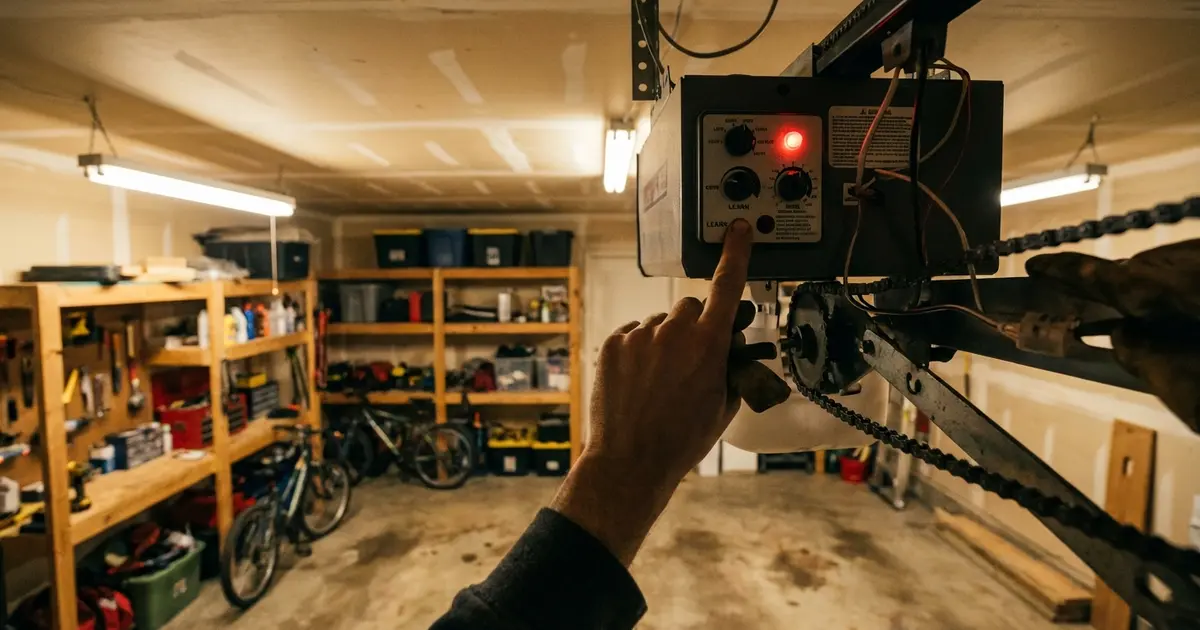
The Learn button is on the back or side panel of the motor unit (the rectangular box mounted on the ceiling). You may need a step stool to reach it. The button is typically:
- Purple/Violet: Security+ 2.0 models (most openers made after 2011) — these use 315 MHz or 893 MHz frequency and rolling code technology
- Yellow: Older Security+ models (1997–2011 era) — 390 MHz rolling code
- Green: Even older multi-code models (pre-1997 in many cases)
- Orange: Some commercial/industrial LiftMaster models
Next to the Learn button is a small LED indicator.
Step 2: Factory Reset (Clears All Remotes)
- Press and hold the Learn button for approximately 6–10 seconds
- The LED beside the button will illuminate, then turn off
- Release the button. All programmed remotes and accessories are now erased
On some models, a second LED flash confirms the clear. If the LED turns off before 6 seconds, hold longer — the clearing sequence requires sustained pressure.
Step 3: Reprogram Your Remote
- Press the Learn button briefly (about 1 second) until the LED illuminates — do not hold it down this time
- Within 30 seconds, press and hold the button on your remote until the opener light flashes or you hear two clicks from the motor unit
- Test by pressing the remote button — the door should respond
- Repeat for each additional remote
LiftMaster myQ / Smart Opener Models
If your opener is a myQ model (Wi-Fi enabled with the myQ app), it has an additional setup button on the motor unit for the Wi-Fi connection. The Learn button reset clears remotes but may not clear the Wi-Fi/myQ setup. To fully reset a myQ opener, also delete the device from your myQ app, then use the Wi-Fi setup button to reconnect to your network. See the Wi-Fi reset section below for details.
Genie Reset Guide
Genie openers are the second most common brand in the US. They've used several different code systems over the decades — make sure you identify your model before following a reset procedure, as the steps differ.
Identify Your Genie System
- Intellicode (Gen 2) — Most models made after 1995: Uses rolling code technology. The Learn/Program button is typically on the back of the motor unit.
- Intellicode (Gen 1) — Some early models: Different internal code structure. Identified by the model number on the housing label.
- 9-DIP switch models (pre-1995): Very old openers that use physical DIP switches to set the code. These don't have a "reset" — you change the switches.
Genie Intellicode Reset (Most Common)
- Locate the Learn Code button on the back or side of the motor unit. It's typically a small square button with a small indicator light.
- Press and hold the Learn Code button for approximately 10 seconds until the LED blinks rapidly
- Release. All paired remotes are cleared
- To reprogram: press the Learn Code button briefly (until light comes on), then press your remote button twice within 30 seconds — the opener will click or flash to confirm
Genie Aladdin Connect Models
Aladdin Connect is Genie's smart home system. The remote/Learn reset is the same as above. To reset the Aladdin Connect Wi-Fi module separately: hold the Aladdin Connect button (if present on the motor unit) or reset via the Aladdin Connect app. Removing and re-adding the device in the app also clears the connection.
Craftsman Reset Guide
Craftsman garage door openers sold through Sears/Kmart historically used the same Chamberlain/LiftMaster platform — the hardware and programming procedures are essentially identical. However, newer Craftsman models sold through Ace Hardware and other retailers may differ.
Craftsman (Chamberlain-Platform) Reset
Same as LiftMaster/Chamberlain: locate the Learn button on the motor unit (typically yellow on Craftsman models from the 1990s–2000s, purple on newer units). Press and hold for 6–10 seconds until the LED turns off. Reprogram by pressing the button briefly, then programming each remote within 30 seconds.
Craftsman 3/4 HP and Newer Models
Some newer Craftsman models have a "LEARN" button on the back of the unit with an indicator LED. The reset procedure follows the same pattern as above. If your Craftsman opener shows a different button layout, check the model number sticker on the motor housing and search for "[model number] programming instructions" for your specific unit.
Identifying Very Old Craftsman Openers
If your opener was installed before the mid-1990s and doesn't have a Learn button, it may use DIP switches (physical toggle switches) to set the code. The code in the remote must match the code in the opener — to "reset" this system, just flip the DIP switches in both the opener and the remote to the same new pattern.
Linear, Stanley, and Other Brands
Linear / Mega Code
Linear openers (common in apartments and condos) use the Mega Code system. To reset: press and hold the Program button (usually red) for 10 seconds until the indicator light goes out. To reprogram: press Program once, then press the button on your Linear remote within 30 seconds. Many Linear remotes require pressing the remote button multiple times during programming — consult your specific remote model's instructions.
Stanley
Older Stanley openers (pre-2000) typically use the same DIP switch system as old Craftsman. Newer Stanley-branded openers use the Chamberlain platform. Check if your opener has a Learn button — if so, follow the LiftMaster/Chamberlain procedure above.
Marantec
Marantec is a German brand found in higher-end homes. Their remote programming uses a direct teach mode: press the "P" button on the motor unit, then press the remote button you want to program. Clearing all remotes: press and hold "P" for 10 seconds. Marantec remotes use 315 MHz BiSecure or 433 MHz protocols depending on model age.
Wayne Dalton
Wayne Dalton openers may use the IDCODE or HomeAccess system. Locate the Learn/Program button (location varies by model). The reset procedure is: press and hold the Learn button for approximately 10 seconds to clear all codes. Reprogram by pressing Learn once, then programming each remote.
No-Name and Older Openers
If your opener has no brand identification or is very old, look for a row of DIP switches (small physical toggle switches) either inside the opener housing or behind a cover on the remote. Set both to the same combination to establish a new code. These fixed-code systems don't have rolling code security — if you have one of these openers, consider upgrading to a modern opener for significantly better security. See our opener repair vs replace guide for guidance.
Reprogramming Remotes After a Reset
After any factory reset, all remotes must be reprogrammed. The general procedure works for most modern openers:
- Go to the motor unit on the ceiling
- Press the Learn button briefly (1–2 seconds) until the LED lights up steadily
- Within 30 seconds, hold your remote 3–5 feet from the motor unit and press the button you want to program
- Hold the remote button until the opener light flashes or you hear two clicks from the motor
- Test immediately by pressing the remote button from a normal position
- Repeat for each additional remote, starting from Step 2 each time
Multi-Button Remotes
If you have a multi-button remote (e.g., a 3-button remote for a house with two garage doors and a gate), program each button separately: start the Learn sequence on the opener, press and hold the specific button on the remote, wait for confirmation, then repeat for the second opener using its own Learn button.
When the Remote Won't Program
If a remote won't program after multiple attempts:
- Replace the remote battery — even a fresh remote out of the box can have a weak cell
- Verify you're pressing Learn for the right duration: too short or too long both fail
- Try programming from within 2 feet of the motor unit — interference from LED lights or metal in the ceiling can interfere
- Verify the remote is compatible with your opener's frequency (315 MHz vs 390 MHz vs 433 MHz — mismatched frequencies won't program regardless of how many times you try)
- If the remote has never worked with this opener, check the remote's documentation for compatibility
Reprogramming Keypads After a Reset
Wireless keypads (the units mounted on the exterior garage wall or door frame) also need reprogramming after a reset.
Standard Keypad Programming (LiftMaster/Chamberlain)
- Press the Learn button on the motor unit briefly until the LED lights up
- Within 30 seconds, go to the keypad
- Enter your desired PIN (typically 4 digits), then press ENTER or the up/down arrow button
- The opener light should flash or you'll hear two clicks to confirm
- Test: enter your PIN and press Enter — the door should operate
Genie Keypad Programming
- On the keypad, press the program button (sometimes inside the keypad housing behind a cover) and enter a new 4-digit PIN
- Press the Learn button on the opener briefly
- Return to the keypad within 30 seconds and press SEND or the operating button twice
- The opener will confirm programming with a flash or click
Setting Temporary Access Codes
Many modern keypads (LiftMaster 877MAX, Chamberlain KLIK2U, etc.) support temporary PINs that expire after a set number of uses or time period — useful for contractors, houseguests, or service visits. These can usually be set via the myQ app or through a keypad programming sequence specific to your model. Check your keypad's manual for "temporary PIN" or "one-time PIN" features.
Programming HomeLink (In-Car Garage Door Opener)
HomeLink is a wireless system built into many cars' sun visors or overhead consoles. After resetting your garage door opener, you'll need to re-train your car's HomeLink buttons.
Step 1: Clear HomeLink Memory (If Needed)
If the button was previously programmed to the old opener code, you may need to clear it first:
- Press and hold the two outer HomeLink buttons simultaneously
- Hold for about 20 seconds until the HomeLink LED blinks rapidly
- Release — all buttons are now cleared
Note: Clearing HomeLink erases ALL three buttons — not just one. If other buttons are programmed to other devices (gate, second garage), those will also be erased.
Step 2: Train HomeLink to Your Opener
With your hand-held remote visible and ready:
- Hold the remote close to the HomeLink button in your car (within 1–3 inches is best)
- Simultaneously press and hold BOTH the remote button AND the HomeLink button you want to program
- Hold both buttons simultaneously until the HomeLink LED changes from blinking slowly to blinking rapidly — this indicates a code transfer
- For rolling-code openers only (all openers made after ~1995): Keep the HomeLink button pressed and go to the opener motor unit. Press the Learn button once. Return to the car within 30 seconds and press the HomeLink button once more for 2 seconds. The opener light will flash to confirm the rolling-code handshake is complete.
HomeLink Not Working? Common Issues
- Didn't complete the rolling-code handshake: If you stopped after the initial code transfer without pressing the Learn button on the opener, HomeLink is trained to a fixed code — but rolling-code openers won't respond to it. Redo the procedure including the Learn button step.
- Remote battery dead during training: The remote must have sufficient battery to transmit during programming. Replace the battery and try again.
- Car battery interference: Some cars with proximity key fobs emit RF signals that interfere with HomeLink programming. Try programming with the car's engine off and key fob in a different room or faraday pouch.
- Older HomeLink system: HomeLink systems before about 2005 used a different programming sequence. See HomeLink's official compatibility tool at homelink.com with your car's year and make for the exact procedure for your vehicle.
Programming Car2U
Car2U is a competing in-car garage door system found in many Chrysler, Dodge, and Jeep vehicles. The general programming approach is similar to HomeLink:
- Press and hold the Car2U button you want to program for 20 seconds until it blinks rapidly (this clears previous programming)
- Hold your remote near the Car2U button and press both simultaneously until the light blinks
- For rolling-code compatibility: press the opener's Learn button, then press the Car2U button once more within 30 seconds
Car2U also supports "two-way" communication on some opener models — if your opener supports it, the Car2U button will confirm whether the door is open or closed. This feature must be separately enabled per the Car2U documentation.
Resetting Travel Limits and Force Settings
Travel limits and force settings are separate from the remote access reset. However, if your opener behaves oddly after a reset (door stops short, reverses unexpectedly), these may need adjustment.
Travel Limit Adjustment
Older openers (adjustment screws): Look for limit screws on the motor unit labeled UP and DOWN (or with arrows). Use a flat or Phillips screwdriver to adjust — clockwise typically increases travel distance in that direction. Make quarter-turn adjustments and test each time.
Modern LiftMaster/Chamberlain openers: Press the Learn button on the motor unit, then press the set button on the wall panel (if you have a Smart Panel) or follow the opener's LED-guided limit-set mode per the manual. The door will cycle to each endpoint and you confirm the limits.
Modern Genie openers: Some models have an auto-set mode — cycle the door once and the opener measures the travel automatically. Others require manual limit adjustment screws.
Force Setting Adjustment
If the door reverses without reaching the floor (and sensors are confirmed aligned), the close force may be too low. Adjust the FORCE or PRESSURE control on the motor unit slightly clockwise (more force) — then re-run the obstacle reversal test to confirm the door still safely reverses when it hits an object. Never set force so high that the reversal test fails.
For a full troubleshooting guide on a door that won't close, see our complete garage door won't close guide.
Resetting Wi-Fi and myQ Connections
If your opener is Wi-Fi connected (myQ, Aladdin Connect, etc.), the remote reset doesn't always clear the Wi-Fi configuration. Here's how to reset it:
LiftMaster myQ Reset
- In the myQ app, go to the device settings and select "Remove Device"
- On the motor unit, locate the Wi-Fi button (separate from the Learn button — typically marked with a Wi-Fi symbol or labeled "Internet Gateway")
- Press and hold the Wi-Fi button for 10 seconds to clear the stored network credentials
- Re-run the myQ setup from the app: Add Device → Garage Door Opener, and follow the Wi-Fi setup prompts
Genie Aladdin Connect Reset
- In the Aladdin Connect app, remove the device from your account
- On the opener (or Aladdin Connect module), press and hold the pairing button for 10 seconds
- Re-add via the app using the module's serial number
General Wi-Fi Troubleshooting
If your opener won't connect to Wi-Fi after a reset:
- Verify you're connecting to a 2.4 GHz network — most garage door opener Wi-Fi modules don't support 5 GHz
- Ensure the router isn't too far from the opener (garage walls attenuate signal significantly) — a Wi-Fi extender near the garage can resolve connectivity issues
- Temporarily move the router closer during setup if connectivity is marginal
Troubleshooting: When the Reset Doesn't Work
If the reset procedure doesn't seem to work, here's a diagnostic checklist:
| Problem | Likely Cause | Fix |
|---|---|---|
| Learn button LED doesn't light up | No power to opener | Check outlet, circuit breaker, GFCI reset |
| LED lights but remote won't program | Frequency mismatch | Verify remote is compatible with opener (check frequency on each device) |
| Remote programs but door won't move | Separate mechanical/sensor issue | Check sensors, door lock, manual operation |
| Old remote still works after "reset" | Reset wasn't held long enough | Hold Learn button until LED turns OFF (not just on) |
| Car HomeLink programs but doesn't work | Rolling-code handshake incomplete | Redo HomeLink with Learn button step |
| Door works from remote but not keypad | Keypad not reprogrammed | Follow keypad programming steps above |
Opener Doesn't Respond to Anything
If the opener has no response to the wall button, remote, or Learn button, first check power: is the opener plugged in? Is the outlet working (plug in a lamp to test)? Is a GFCI outlet in the circuit tripped? Is a circuit breaker tripped? If power is confirmed and the opener is completely non-responsive, the logic board may have failed. See our opener repair vs replace guide for next steps.
DIY vs Calling a Professional
Resetting and reprogramming a garage door opener is firmly in DIY territory — there are no high-tension components involved and the only tools required are a step stool and possibly a flashlight. The vast majority of homeowners can complete a reset and reprogram in under 10 minutes.
✅ Confidently DIY
- Pressing the Learn button to reset access codes
- Reprogramming remotes and keypads
- Programming HomeLink or Car2U
- Adjusting limit and force settings (minor adjustments)
- Reconnecting Wi-Fi / smart home integration
⚠️ Get Professional Help When
- The opener is completely non-responsive (may need circuit board diagnosis)
- You've completed the reset but the door still behaves erratically — the problem isn't the programming, it's mechanical
- The opener is 10+ years old and you're experiencing multiple problems — might be time for a replacement evaluation
- You're uncomfortable on a step stool reaching the motor unit
A professional tune-up that includes limit/force adjustment and safety inspection typically costs $75–$150. If you're having multiple issues, this is often worth the investment. See our garage door maintenance schedule for what a full tune-up includes.
Find a Garage Door Pro Near You
If the reset doesn't solve your problem or the opener needs replacement, a local technician can help quickly.
- Find trusted garage door pros in Los Angeles
- Find trusted garage door pros in San Antonio
- Find trusted garage door pros in Philadelphia
- Find trusted garage door pros in Charlotte
- Find trusted garage door pros in Las Vegas
Or browse all 50 cities to find technicians near you.
Frequently Asked Questions
Will resetting my garage door opener delete my programmed remotes?
Yes — a full factory reset erases all programmed remotes, keypads, and in-car HomeLink/Car2U buttons. This is intentional: the reset clears all access credentials so a new owner (or a homeowner who lost a remote) can start fresh. After resetting, you'll need to reprogram every remote, keypad, and vehicle system that you want to use with the opener. If you don't want to lose your programmed devices, don't do a full reset — instead, look for a way to delete only specific remotes (most modern LiftMaster, Chamberlain, and Genie openers allow you to delete individual devices).
How do I reset a LiftMaster or Chamberlain garage door opener?
For most LiftMaster and Chamberlain openers (both use the same platform): Press and hold the "Learn" button on the motor unit for 6–10 seconds until the LED beside it goes out. This clears all programmed remotes and accessories. To reprogram a remote: press the Learn button briefly (about 1 second) until the LED lights up, then press the button on your remote within 30 seconds. You'll see the opener light flash or hear two clicks to confirm programming. For myQ-connected openers, you may also need to reset the Wi-Fi settings separately via the myQ app or by pressing the Wi-Fi setup button on the opener.
How do I reset a Genie garage door opener?
On most Genie openers, the Learn/Program button is located on the back or side of the motor unit — sometimes labeled "Learn Code." Press and hold this button for about 10 seconds to clear all codes; the indicator light will blink to confirm the reset. To reprogram: press the Learn button briefly until the light blinks, then press your remote button twice within 30 seconds. Some older Genie models (using "Intellicode 1") use a different procedure — check the model number on the motor housing label and look up the specific steps for your model on Genie's support site if the above doesn't work.
My garage door opener won't respond to the remote or wall button after I moved into a new home. What should I do?
Start with a fresh reset. Press and hold the Learn button on the motor unit until the LED turns off (6–10 seconds) — this clears any remotes the previous owner had programmed. Then reprogram your own remote(s): press Learn briefly, then press the remote button until you get a confirmation signal. Also check the wall button wiring — sometimes the previous owner's wall console is a smart panel that requires a specific LiftMaster/Chamberlain model (they're not all interchangeable). If the wall button doesn't work at all, try jumping the wall button terminals with a short piece of wire — if the opener responds, the issue is the wall button/wiring, not the opener.
How do I reprogram my HomeLink (in-car garage door opener)?
HomeLink is a system built into the sun visor or rearview mirror of many cars (Chevy, Ford, BMW, Toyota, etc.). To program it: first, clear the HomeLink memory by holding the two outer buttons simultaneously for about 20 seconds until the light blinks rapidly. Then, hold your remote near the HomeLink button and press both the remote button and the HomeLink button simultaneously until the HomeLink light blinks rapidly (for older openers with fixed codes) or changes from slow to rapid blinking (for rolling-code openers). For rolling-code openers (all openers made after about 1995), you then need to go to the opener motor unit, press the Learn button, and then press the trained HomeLink button once more within 30 seconds to complete the handshake. The exact procedure varies by car model year — consult HomeLink's website (homelink.com) with your vehicle year/make/model for precise steps.
My garage door opener keypad stopped working after I changed the battery. How do I fix it?
A keypad PIN is usually stored in the keypad's non-volatile memory and shouldn't be erased by a battery change. If the keypad won't work after a battery change, first confirm you're using the correct PIN (it may have been set by someone else). Then check the battery contacts for corrosion. If the keypad's LED doesn't light up when you press buttons, the new battery may be installed backwards or the contacts are corroded — clean with a pencil eraser or fine sandpaper. If the keypad lights up but won't open the door, the keypad may have lost its programming due to the power interruption. Re-enter Programming mode: go to the opener, press the Learn button, return to the keypad within 30 seconds, enter your desired PIN, and press Enter. This re-links the keypad to the opener.
How do I reset my garage door opener travel limits and force settings?
Travel limits and force are separate from the remote/access reset — they're mechanical or electronic settings that control how far the door travels and how hard the opener pushes. On older openers: use the limit and force adjustment screws on the motor unit (usually labeled with arrows or UP/DOWN). Clockwise = more travel or more force, counterclockwise = less. On modern electronic openers: enter Programming mode (press the Learn or Program button) then follow your manual's limit-set procedure. For LiftMaster/Chamberlain models with the purple or yellow Learn button, the procedure involves letting the door travel to each endpoint and confirming those positions as the new limits. After adjustment, always run the obstacle reversal test: place a 2x4 under the door and close it — the door must reverse within 2 seconds.